Some deliveries may take a little longer than usual due to regional shipping conditions.

قم بتنزيل التطبيق


معلومات عنا
حقوق الطبع والنشر © 2024 Desertcart Holdings Limited
قم بتنزيل التطبيق

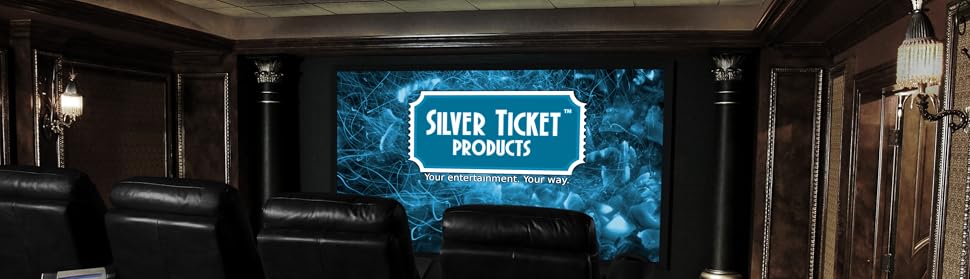
🎬 Elevate your home theater game with Silver Ticket’s ultra-crisp 106" cinematic canvas!
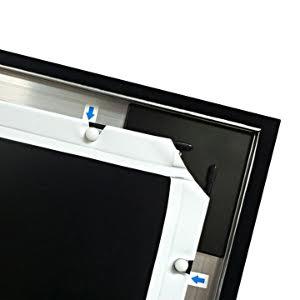
The Silver Ticket STR Series 106" fixed frame projection screen delivers a premium home theater experience with a 160° viewing angle, 1.1 gain white surface optimized for 4K/8K HDR and Active 3D, and a durable aluminum frame wrapped in black velvet to enhance contrast. Designed for native 16:9 projectors, it mounts securely on walls with adjustable brackets and assembles quickly using a tensioning rod system, making it the perfect upgrade for millennial professionals seeking immersive, high-quality entertainment.



| ASIN | B00CYLK1BQ |
| Best Sellers Rank | #23 in Projection Screens |
| Brand | Silver Ticket Products |
| Customer Reviews | 4.7 out of 5 stars 6,672 Reviews |
| Display Dimensions | 106 inches |
| Enclosure Material | Aluminum |
| Item Dimensions W x H | 96.88"W x 56.75"H |
| Item Weight | 28 Pounds |
| Manufacturer | Silver Ticket Products |
| Material | Aluminum |
| Mounting Type | Wall Mount |
| Operation Mode | Manual |
| Product Dimensions | 96.88"W x 56.75"H |
| Screen Dimensions | 106 inches |
| Screen Finish | 160 Degrees |
| Screen Surface Description | 160 Degrees |
| UPC | 763461679962 |
| Unit Count | 1 Count |
| Viewing Angle | 160 Degrees |
K**.
Outstanding Quality and Value – Perfect 16:9 Upgrade
Excellent quality screen for the price. All materials feel solid and high-quality, from the frame to the screen material itself. Assembly was straightforward and took about an hour, even taking my time to do it right. This screen replaced my old legacy widescreen that wasn’t a true 16:9 format, and the upgrade is immediately noticeable. The image now fits perfectly, looks sharper, and really elevates the home theater experience. For the price point, it’s hard to beat the build quality and overall performance. Highly recommended.
M**Y
A very good screen at an economy price.
I am really impressed with the image quality this screen provides. I have the Epson 5050UB projector in my living room with minimal room treatments. I will have blackout curtains on the windows, but don't plan to paint the walls or ceiling, which are currently white. I was concerned about ending up with a washed out image due to poor light control. I come from an 82" Samsung Q70R with excellent contrast, so black levels are important to me. Right away after assembling and hanging the screen, I was impressed with the contrast and black levels, even with light coming in through the windows. Once it's dark, the image explodes off the screen. The Revenant, followed by Ready Player One, both in 4K, looked amazing. The 5050UB is known for it's great blacks and contrast but this image is everything I had hoped for. I went with the light grey to give the black level a little boost and I am very pleased with the result. As far as colors and the rendering of bright daylight images, this screen and projector combo are a knock out. The sun through the trees in The Revenant made us want sunglasses. The dark scene detail is also amazing. Something even my QLED TV could never do. For those wondering, the screen was actually easy to assemble. Just be sure you have a large open area of floor and vacuum before you start. I was worried about the process, stretching the screen, but it really does go together nicely. The center support bar went in smoothly also. Note to the novices: don't forget to install the hanging brackets before you assemble the frame corners. I did forget and ended up having to make hanging brackets to fit the frame rather than disassemble it to install the hangers. All in all, it turned out excellent. I highly recommend the Silver Ticket light gray screen with the Epson 5050UB.
P**T
Fantastic screen. Exceeded expectations.
I purchased the STR-169120 120" 16:9 white material screen. I reserve the 5-star review for the best of the best, but this purchase meets the criteria -- exactly as described, high quality product, straightforward setup, and good customer support. Before I even received the screen, the Silver Ticket reached out via email and linked the setup video. Even though it was an automated message, they made it clear that I had product support should I need it. Putting the thing together took a bit of time (>1 hour), but it was simple enough with the video instruction. Minimal tools required -- just a Phillips-head screwdriver. The physical instruction manual wasn't the best I've seen, but the video instruction goes step-by-step with great detail so I only glanced at the instruction manual briefly to confirm I had all the parts. All parts and hardware were clearly labeled and in good condition. Came with a few extra screws and plastic screen lugs, so that made me a bit nervous, but the setup was straightforward enough that I realized quickly that I wasn't missing any steps. My biggest concern was whether the screen frame would fit together perfectly enough to make sure everything remained in square and that the screen material would stay wrinkle-free and taut, but the attachment bracers pull the sides in nice and tight. I checked it with my framing square once I was done putting the frame together and it was pretty much perfect. The connections are tight enough where you can't even see the seams where the bars attach to one another. The tension rod system also allows you to stretch the screen over the frame really easily, and the end product was a nice uniform, wrinkle-free appearance. It sits against the wall more flush than my 65" LED TV and only sticks out maybe 3 inches. Looks fantastic and satisfies the perfectionist side of me. Mounting was really simple too. The 4 mounting brackets (2 top, 2 bottom) can be slid into desired position so you can effectively position the screen on the wall however you want without worrying about where your wall studs are. The only thing I would suggest here is sliding one mounting bracket in from each side (one from top left, one from top right, one from bottom left, one from bottom right) rather than sliding them in from the same side like they suggest in the setup video. The reason is because to slide one of the brackets to the opposite side, I had to remove the support bar, then it took some jiggering to get the piece to slide over the center joint. Minimal issue but worth noting. The quality of the picture at 120" far exceeds the picture when I was just projecting onto my white wall or the cheap white projector sheet that I purchased as a placeholder until I could get a real screen. The black frame actually absorbs light spill so even though there is a bit extra due to my angling of my projector and using keystone correction to fit the screen, you can't tell at all. Seriously looks like a professional quality movie screen. Overall, I'm beyond pleased with this purchase. Setup was simple and straightforward, it looks sleek and stylish, and it reflects a beautiful picture. Highly recommend if you are in the market for a fixed-position projector screen. 5/5 across the board.
J**S
A fixed screen is a MUST for a good indoor projector setup, and this one doesn't disappoint!
After researching a handful of brands I bought a 110" white (non acoustic) Silver Ticket screen on Amazon. I have it coupled with an Optoma HD143X ceiling mounted projector. This is the first time I've set up an indoor fixed screen and projector. I have an outdoor setup as well, which is my only frame of reference. Overall I'm very happy with the screen. It was fairly easy setup, step by step, and took about 2 hours to completely set up and mount to the wall. I worked somewhat methodically, and was able to do everything from start to finish by myself, including mounting it to the wall. That said, I'm pretty tall with a large arm span so this probably isn't feasible for most people. Some things to note: 1) I mounted my projector before even purchasing the screen to be able to figure out exact sizing. I had intended to go with the 120" screen, but after mounting and testing determined that 110" would be a better fit. 2) Once I had the frame complete, I turned on the projector and mounted the frame to the wall (NO screen attached yet). This allowed me to get exact placement more easily, and not run as much risk of damaging the screen while figuring this out. Once I had that figured out, I installed the mounting screws to the wall and took the screen down to do the final install of the screen. 3) Getting the screen back up for final install proved to be the most painful part. The mounting "sliders," once attached to the top two screws in the wall, did not want to slide horizontally. The weight of the screen and friction created made it quite difficult, so I detached one at a time and slid them into place then remounted, working back and forth, until it was right. I combined this with slight adjustments to the projector mount as well, though the sensitivity of those slight adjustments proved to be tedious as well. In any event, it was a bit of back and forth between the projector mount and the sliders for the screen, but it ultimately lined up perfectly. The screen looks fantastic and is perfectly tensioned (no wrinkles). The black edges absorb the bit of light from the projector, so the image runs top to bottom and left to right without any gap around the edge, ultimately looking perfect once everything was fine tuned. Additionally, the Optoma HD143X has a light band around the entire picture it puts out (something innate to the DLP chip they used which is not a flaw according to the company, but rather just how that chip is...I learned this after purchasing). The screen takes care of that issue so, while I can make out that light outside the screen edges, it's really hardly noticeable. Overall the most important part is these fixed screens (whether this one or another brand) are far cleaner looking than drop down screens (which I use in an office environment). If you're going to go to the trouble of setting up an indoor projector, the final setup is only as good as the weakest link. I'd definitely recommend a fixed screen HANDS DOWN if you care at all about final picture quality.
A**F
Excellent product that was packed adequately and shipped quickly
Excellent product that was packed adequately and shipped quickly. All the parts were included with a few extras of the small items. I'm very impressed with how well engineered this product is. The frame is extruded aluminum wrapped in a nice quality velvet felour that acts as a light absorber so that you don't have to prefectly place your projector. No, this doesn't mean you can move it amy more than a few inches beyond the lens limits, but it gives you needed flexibility for those with ceiling mounts for example. The screen itself is a nice quality stretchy vinyl that also acts to tension itself against the frame, thus removing any wrinkles from being rolled for shipment. Assembly was straightforward. If found the instructions well done and illustrations appropriate for each step. Just be sure to follow each step in order. Take your time and know what you need to do and why. Don't try to be smarter than the instructions to save time. I don't think you can improve on them in any way. Many here have had trouble with the center tensioning/support bar. Just place the bar in the slots on the top and bottom with one side of the bar centered in the joint opposite of where you are working. I then loosene a ffew of the tabs that hold the screen to the edges of the frame. Then I used a rubber mallet to tap the support bar along the groove nearest you while making sure the opposite end of the bar stays in place. Once the bar is in place just pull the screen over the tabs again. Voila. you are done. For me the one thing I did do is after assembly of the frame but before installing the screen. I place the frame only against the wall supported by a couple chairs. Without the screen in the way, it's much easier to see where to place the screws into the wall. I then hung the frame (without the screen installed yet), to make sure it was where I wanted. the slotted design allows the sreen to be moved to the left or right (but not up or down), for final adjustments. I then took the frame down, installed the screen and placed the compleeted screen on the wall over the already installed screws. The final assembled product looks great and my projector an Epson HC3700, came to life. I've never owned a permanent screen before, so I can't speak to other brands, but I'm very much impressed with the ease of assembly and overall quality of this product. One final thing, the whole process took almost 2 hours. That includes a couple of breaks for a soda, and taking my time to ensure no mistakes. Before starting I read through the instructions till I had a firm picture of the process in my head and as I went along I reread the instuctions for the next step. I still missed one step, but I caught it right away and lost no time. I like the way it looks o the wall and I liked it even better with Dances With Wolves playing on screen.
E**M
I cursed less than 10 times during assembly!
So far so good for a budget-friendly screen. Well, depending on your budget. Quick back story; I bought my first projector last summer (Optoma GT1080... that's next on the list to be upgraded) and started "building" my first home theater from there. I was projecting on a beige wall for a few months, then graduated to $18 white eggshell paint from Menard's, and finally upgraded to a real screen. At least a real entry-level screen. My painted screen was 140" 16:9, and while it was HUGE and cool, it was admittedly too ambitious for the room size (10W x 14L). I decided on 2.35:1 since we are watching more movies now that we were originally. I also play PS4 and XBO, so having a smaller 16:9 area on this Silver Ticket screen is actually much easier on the eyes. I plan to make some masking panels for 16:9 content here one of these days. SCREEN: 4.5/5 Stars The screen itself is pretty great so far! I'm loving the grey as opposed to white. It seems to be reflecting less light around the room than the white paint did, which means my picture isn't being washed out as much. Our walls are a very dark bluish-green in eggshell, so they aren't too reflective. The black levels are much better on the Silver Ticket screen than I got with the paint, and the clarity of the screen is also much better since it doesn't have that texture from being painted on with a roller. :P BUILD QUALITY: 3.5/5 Stars The build quality is...questionable. There were a few screw holes that were clearly drilled in the wrong place and then re-drilled, and re-drilled, and re-drilled until a hole that was supposed to be about 1/4 inch round, was 1/4 inch tall and an inch long. I still managed to get the screws to stay with washers I had on hand. ASSEMBLY: Ouch/5 Stars The instructions were actually fine, which isn't what I was expecting after reading other Silver Ticket screen reviews. And the assembly went swimmingly until I got to the last two steps: stretching the screen, and installing the vertical center bar. I'm fairly strong... Like, a few steps stronger than "I can carry boxes for my grandma" strong. But stretching the screen to fit on the last little plastic things was like trying to stretch a piece of wood. I didn't think it was actually going to happen, but after a solid 10 minutes it finally stretched just enough. It really doesn't look like it's going to stay, but so far it is. And the vertical center bar that goes in last took equally as long and ended in a pretty painful cut on my finger and a sort of smashed fingernail. I literally had to hammer the bar into place, carefully yet forcefully. All that said, the screen looks wonderful when it's up. My picture I posted isn't the best, but I'll post more later when I have time. I think when it's time to upgrade, I'll call the local home theater place and have them assemble and install the next one for me. But for now, this thing does the trick! I'm very happy with it, especially for the price. $280 for a good screen is a fine deal in my book. Just be prepared to curse when you're stretching the screen, and definitely get an assistant to help you. My wife was gone last night when I was putting it together so I had to fly solo.
R**L
Cannot Beat the Value!
Update after three years of use: I uninstalled my screen a few days ago to access some equipment behind the screen and found that the fabric bonding for one of the rod pockets had come "unstuck" over several inches. A photo is included to illustrate. Because this is the first time I could see behind the screen since installation, I can't be sure when this happened. This has not yet come loose far enough to be visible on the exposed projection image side. However, as you can see from the photo, only another inch or so needs to let loose before it can be seen. While it's been a while, I think its fair to expect that was not supposed to happen and was a manufacturing defect. I have reached out to Silver Ticket to see if they can help. I'll update this review when they respond. Here's the original review from 2015: This is my third acoustically transparent screen...the last was a Draper AT1200 106" screen. I wanted to go bigger because my new JVC RS46u can throw a bright enough picture in 3D to make this possible. I've been a home theater fan for many years, and have owned a dedicated theater for well over a decade. Since the days of Laserdiscs, CRT projectors, and Dolby Surround. (You might find me on AVSForum, Emotiva Lounge, or the Polk Audio Forum as "rtart.") As part of my constant upgrade path, I did a lot of reading online before pulling the trigger on the ST screen reviewed here so had no surprises about the assembly instructions (or lack thereof). Watching the YouTube video makes it all clear, and a little mechanical inclination makes it fairly easy to put together and mount. The biggest issue with screens is their shipping size and cost...a ten foot long box is going to cost to ship. ST makes this screen frame in sections, so the longer (top and bottom) frame sections have to be connected somehow. ST manages this issue well, with a very sturdy connector between the two sections. The frame side sections are one piece, so no middle connection is necessary. Corners go together with reinforcing brackets and screws, and are very sturdy. After joining the top and bottom halves, put the corner brackets on the top and bottom first, then connect the frame sides. I recommend adding the hanging brackets at this point, and figure out how you are going to mount the screen to the wall. Trust me, it's easier to do if you can reach through before the fabric is installed. Once you mount the wall bracket halves onto the wall, its time to install the fabric. Pull down the frame and lay it "ugly" side up. Roll out the fabric and thread in the rods in the pockets. The shorter ones go on the top and bottom and meet in the middle. Start in with every third spring to get started, then fill in the ones that are missing. (The diagram does help a little here....the springs should clip down over the rods, and then the other end into the channel on the frame) Fabric is pulled snugly by the springs, but inserting the middle supports (there are 2 here) was easy. I installed the hanging brackets onto the frame first, and set one end against the bracket while "encouraging" the other end to the other bracket with a mallet. If you orient them correctly (see the diagram) they will go in pretty easily...but you WILL need a mallet to get it done. Don't be shy, but you might want to wrap the mallet in a clean cloth to protect the screen surface. A few small wrinkles in the screen, but I expect them to come out in a day or two. If this is an issue, I will revisit this review. Fabric appears to indeed be 1.1 gain, as compared to my other screens and a couple of samples from other manufacturers. Acoustic performance also appears to be as good as past screens I have owned. The weave of the fabric is invisible from my viewing distance, which is around 11 feet. All things considered, this is a substantial screen that appears to have cost a LOT more than I paid. I would recommend it to anyone considering it. Took me about an hour, by myself, from opening the box to watching a movie.
J**R
Unbeatable for the price
You can not beat this screen for the price. I am very glad I made the decision to purchase this one over the one I was going to buy that was a few hundred dollars more. The picture quality projected on this screen is excellent. I have it paired with a BenQ HT1075 projector and it really is incredible. My only slight (very slight) gripe about this screen is in the corners it isn't perfectly flush against the frame. You don't notice it while watching movies, but I noticed it when I finished assembly and mounted it to the wall. It would be nice if it had some sort of extra anchor for the screen material to attach to the frame in the four corners. But it is very slight, and nobody you show this screen to will ever notice. Assembly was about as simple as you can expect something like this to be. The frame is 6 pieces - the two sides are each one complete piece, and the top and bottom are separated in to two pieces each for shipping. They go together fairly simply - a metal bracket joins each of the top and bottom pieces together to make them one solid piece - when together, you can't see the seams at all. The metal is wrapped in felt which gives a great finished look and hides the seams very well. There are "L" brackets for the four corners so once you have it square, the brackets lock it in place. The screen unrolls and you insert long rods through the loops on the sides. This was probably the most difficult part - they did not slide easily through the loops. I actually struggled a bit to get them through on the top and bottom. But once through, they were easy to loop on to the plastic pins you slide in to the tracks on the metal frame. There are arrows indicating where you put the plastic pins and you just stretch the material over and loop it on to each plastic piece and when complete, it is stretched nice and tight - no slack whatsoever. The final step is assembling the center support rod - a bit tight, as it should be, which makes it a bit difficult to get in to place, but not bad. You mount it with 4 screws in to brackets you installed in the same metal tracks on the frame that you put the plastic pins in to stretch the screen on. Find the studs, put the screws in, and line up the brackets (they slide left and right to make it easy to line up with the screws) and you are done! It looks great on the wall and the picture quality is incredible. I am very happy and would absolutely recommend this screen to anyone looking to buy.
ترست بايلوت
منذ أسبوعين
منذ شهر