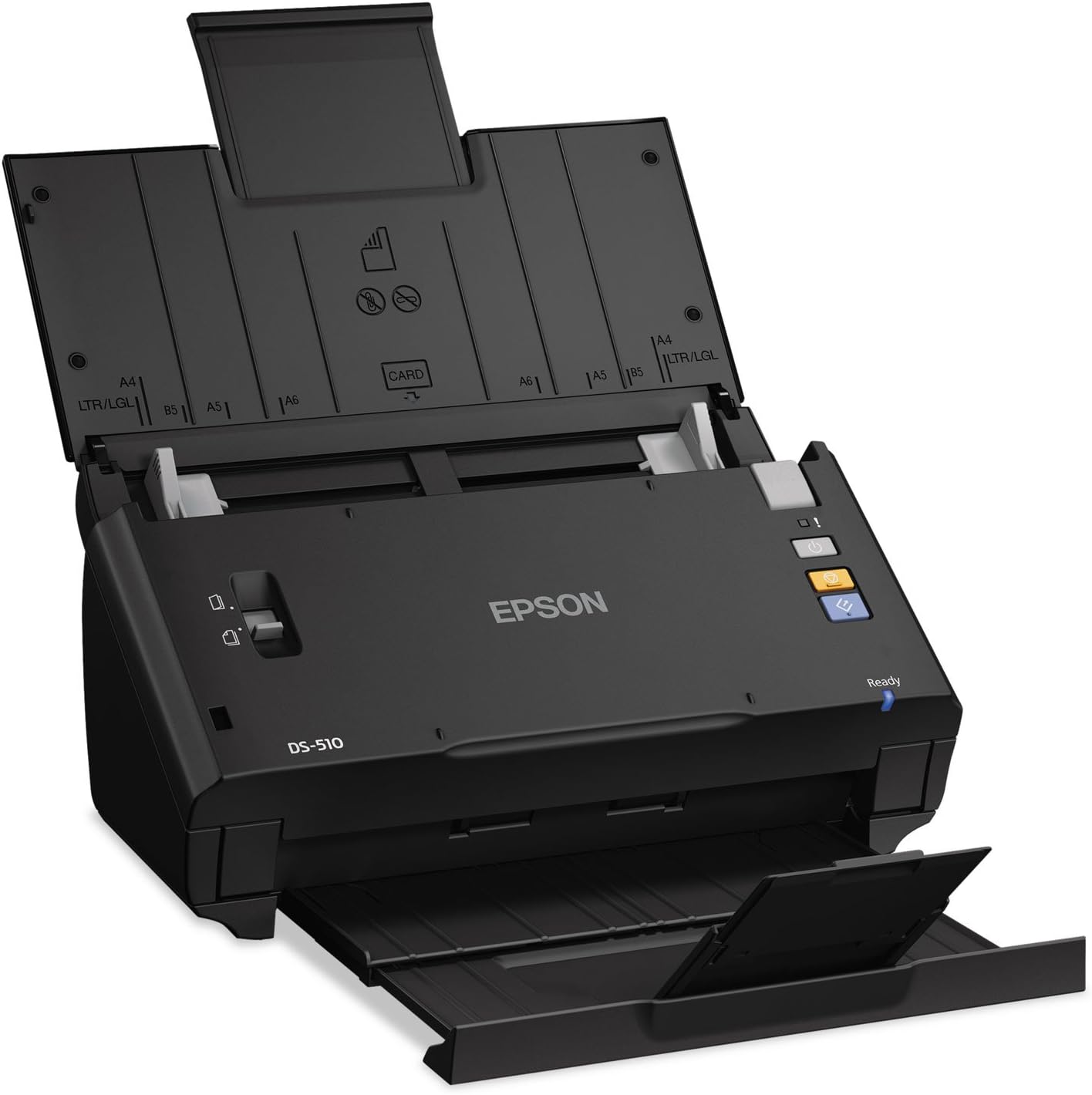
Epson WorkForce DS-510 Color Document Scanner
Product ID: 1145006
Details
- Scanner TypeDocument
- BrandEpson
- Model NameDS-510
- Connectivity TechnologyUSB
- Resolution600
- Item Weight2.5 Kilograms
⚡26 ppm speed
📄50 sheet capacity
🔌USB connection
🚀 Elevate Your Document Game!
The Epson WorkForce DS-510 is a high-performance color document scanner designed for efficiency and versatility. With lightning-fast scan speeds of 26 pages per minute and the ability to scan both sides in a single pass, this compact device is perfect for busy professionals. It supports cloud integration for easy sharing and comes equipped with OCR software for seamless document management.
| Item Weight | 2.5 Kilograms |
| Minimum System Requirements | Windows 7 |
| Standard Sheet Capacity | 50 |
| Connection Type | USB |
| Resolution | 600 |
| Wattage | 18 watts |
| Supported Media Type | Business Card |
| Scanner Type | Document |
P**L
Good scanner, big step up from older Canon MFP
I have been very pleased with this scanner. It has been flawless at scanning personal documents and old publications. I had been struggling with a Canon MP530. Although that is a good multi-function inkjet printer/scanner/fax, the scanning speed is very slow, and double-sided scanning requiring running pages through twice.The Epson DS-510 handles pages about 15 times faster than the Canon does, twice that when scanning double-sided documents. I haven't pushed it too hard yet, but it has not had a problem with skipped pages when scanning magazines or other thin documents, nor with standard weight papers. The scanned images are very clear. I'm scanning to PDF/A (archival - it stores the font information in the document so it doesn't have to rely on the font being available in the OS), using de-screening, text enhancement (good for small fonts) and having it produce a searchable PDF. The scanner provides clean, clear images and the software handles everything I've asked at good speed. On larger documents I have to wait for it to process everything into one file, but overall I'm saving a great deal of time and freeing up space in my home (my wife is happy about that) by getting rid of these old publications.I've been able to set up two locations to use the scanner, with two different computers, so I don't have to haul the papers all over the house. It would be more convenient if the power converter were inside the scanner instead of having to move around a separate power block, but that's a minor issue in my opinion.Overall, I'm very pleased with the Epson WorkForce DS-510 scanner. It has met all my expectations without being difficult to use or complicated to set up.
M**S
Oh So Good
After years of fiddling with a 3 in 1 printer to scan, I realized that this was not the way to go . . . and that was putting it mildly. Jammed papers. Too long a process. Loss connectivity with computer. You name it. Yuck.Then I decided to bite the bullet and purchase a scanner. With much research done, I decided (from reading the review) that this Epsom FD-510 might do the trick. Nervously I "laid my money down" and awaited it's arrival with much dread. I'm not good with installing software and understanding computer type directions so I had very strong misgivings. I thought the price too reasonable as compared to the other scanners being marketed.But - boy was I wrong. Easy is not the word for the installation. If I could do it - a monkey could do it. And fast - wow. Before you know it, everything is scanned and on my computer (and I could even find it). No clumps, no worries, just ahhhhhh.I love it. Worth every penny and more. I bet you think that I must work for the company. But I was just so fed up with the stress I was under trying to scan (and fax) with my 3 in one, I can't believe it took me so long to do this. As they say, just do it. It's so fast and takes so many pages zip through, you might have to catch them in midair.
G**T
Scanner
Fabulous works great easy set up
R**.
CAVEAT EMPTOR MAC USERS - Not Compatible with Yosemite - ScanSnap software is worth the price premium
BEWARE MAC USERS - THE SOFTWARE IS NOT COMPATIBLE WITH YOSEMITE AND DOES NOT WORK AS ADVERTISED!!!!After reading the other reviews, I thought I'd roll the dice on this scanner because of the difference in price between it and the ScanSnap - bad idea. I bought this to replace an aging ScanSnap S510M. The Epson software is horrendous and does not correctly support Yosemite or an efficient work flow. The only thing the Epson software does (when it works at all) is bulk scan all documents to a single folder whereupon the user needs to take additional steps to open the new scan: open the scanned file (assuming that you know which one to open because of the limited automatic naming conventions available), rename the file, move it to the correct location, and OCR using a separate program. IT DOES NOT OPEN THE NEW SCAN NOR CAN ONE MAKE IT DO SO; I never realized how important this is. The Epson software is so clunky compared to the ScanSnap software as to be unusable to anyone used to ScanSnap.I spent 4 hours on the phone today with the call center in the Philippines just to get the software to work at all - pinwheel of death all day along with odd artifacts and ghost windows from the software before they transferred me to the call center in Long Beach, Ca, whereupon a guy called Jim told me that the engineers were aware of the problems their software had with Yosemite and that they were working on yet another revision for the software. Jim also told me that no one wants their software to have the ability to automatically open the new scans using Adobe or other third party software and that their research shows that their customers want bulk scanning to a single folder with a clunky UI to change folder destinations and/or scan names. I have a lot of clients and they all have separate folders with separate sub-folders, ad infinitum - one size fits all though according to Epson's research. Horrible planning.Also, the TWAIN drivers are not transparent (to the extent they work at all). I could not scan from Adobe because Epson's Epson Scan software and Epson Scan Settings applications would thwart any attempt by opening themselves and demanding that the Epson UI be consulted after making all necessary selections in Adobe.The only way to scan with Yosemite is with the Epson on screen UI or Apple's Image Capture on screen UI. The single button scan on the front of the DS-510 is only programable through Epson's Document Capture app, however it will only bulk scan to a single file with an inscrutable naming convention and there is no easy way to change the save destination (required that you navigate two additional menus) nor is there any easy way to rename the scan before scanning, requires navigating an additional menu. Basically, for Macs, the one button scan does not work.I can't comment on the hardware because their software was so bad I never got to use it. However, any company that would dole out this half baked software makes one wonder whether their hardware is ready for prime time. Either way, you do get what you pay for. The ScanSnap software is well worth the price premium. Thanks to Amazon for making it so easy to fix my mistake. New ScanSnap ordered.Dear Epson, I will never buy another product from your company. Time is money and your ineptitude and ambivalence cost me the better part of a day and a serious headache. The cost of your temerity is this bad review and my promise to shout from the roof tops about your substandard product. Don't overthink this, get a copy of the ScanSnap software and copy it; take every feature and make your software able to do them. Copy their UI, yours is clunky and not at all intuitive. Give end users the option to use their data in any imaginable way, including but not limited to opening a new scan in Adobe automatically. A good work flow is hard enough to achieve without your ill-conceived software making it impossible. I regret every moment I spent with this machine. I resent that I have to spend another few minutes boxing it back up to send back.
Trustpilot
1 month ago
4 days ago