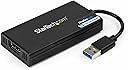



USB32HD4K
Product ID: 10558393
Details
- ColorBlack
- Compatible DevicesMonitor TV
- Connector TypeUSB-A/HDMI
- Item dimensions L x W x H7.9 x 1.8 x
- Specific Uses For ProductMonitor
🌐Cross-platform compatibility
🔌USB 3.2 connectivity
🖥️4K UHD 30Hz output
Desertcart purchases this item on your behalf and handles shipping, customs, and support to Morocco.
🚀 Elevate your workspace with 4K clarity and effortless multi-display power!
The StarTech USB-A to HDMI Display Adapter transforms any USB 3.2 port into a 4K UHD HDMI output, enabling professionals to extend or mirror their desktop with ease. Compatible across major operating systems and powered solely via USB, this compact dongle is designed for seamless multi-monitor productivity, backed by a 2-year warranty and expert support.


| ASIN | B00OD37KHG |
| Best Sellers Rank | #33 in USB-to-VGA Adapters |
| Brand | StarTech.com |
| Built-In Media | USB 3.0 to HDMI External Video Card, Software Installation Disc, Manual |
| Color | Black |
| Compatible Devices | Monitor, Projector, TV |
| Connector Type | USB-A/HDMI |
| Current Rating | 1 A |
| Customer Reviews | 4.6 out of 5 stars 978 Reviews |
| External Testing Certification | CE, FCC, DisplayLink |
| Finish | Glossy |
| Global Trade Identification Number | 00065030859271 |
| Input Voltage | 5 volts_of_direct_current |
| Item Dimensions | 7.9 x 1.8 x 0.6 inches |
| Item Type Name | A/V Cable |
| Item Weight | 0.07 kg |
| Item dimensions L x W x H | 7.9 x 1.8 x 0.6 inches |
| Manufacturer | StarTech.com |
| Mfr Part Number | USB32HD4K |
| Model Number | USB32HD4K |
| Nominal Power | 10 watts |
| Number of Items | 1 |
| Number of Ports | 1 |
| Package Quantity | 1 |
| Power Plug Type | No Plug |
| Specific Uses For Product | Monitor, Projector |
| UPC | 065030859271 |
| Unit Count | 1 Count |
| Warranty Description | 2 Year |
| Warranty Type | Limited |
D**D
A very useful gadget
After reading all the mixed reviews, I was a little hesitant to buy it but am so glad I did. I have a 8 year old Dell XPS8400 with an intel I7 processor, a very nice rig in its day but stuck with PCI-@ 2 video cards. I hated to buy a new computer as this one is still perfectly good and super fast with an added SSD. But I needed to drive both a 30" dell 3400 X 2400 monitor and a new 4K monitor. No way the old video card was up to it, limited to 1900x 1200 dpi on the 4K monitor. So this was the only real choice it seems. Downloaded the drivers, installed with no issues and plugged in the 4K monitor and instant success. It is a flawless picture and even does HD videos pretty darn well, better than expected. The mouse is a bit laggy so have to move it more deliberately but nothing terrible. I did a before and after processor load test and on a dedicated USB3.0 plug, it definitely pulls about 10-15% more load then before; spiking up to about 35% with full video. But hardly overloading it unless you may be running several CPU programs at once. For just internet use it is perfect. But if you use it on a I3 or similar lower power processor, I can see how it may bog down more. On a well running I5 or I7 computer with minimal multiprocessing, it works like a champ. I can guess that reviewer having stuttering and other issues may be overloading the processor, which would definitely cause lots of issues. The adapter gets warm to the touch, so keeping it in a well ventilated area will certainly extend the life. Overall I am quite pleased with it and a good compromise until I have to upgrade my whole system.
P**R
Works with a 2012 Mac Mini running OS ...
OLD review: Pretty much unusable with a 2012 Mac Mini running OS X 10.8.5 and Seiki 40 inch 4k display. It manages to display at 4k, but often flickers or drops out for seconds at a time. REVISED review (2015.2.25): Still may be early to tell, but I've revised my rating to five stars since it looks stable after utilizing a different hdmi cable. I originally used the cable which came with the Seiki, but after switching to another cable I had on hand which is 4k rated with chokes at both ends, it works! Pros: it just worked. No OS X patch necessary, no SwitchX, etc.. Again, this is with OS X 10.8.5, which came with the Mini and is the latest pre-Mavericks OS X release. Cons: Firefox is unusable [revised again, see below]; its pages do not refresh, I have to move the whole app window in order to refresh the page in view after scrolling or clicking a link. I'm not going to take off a full star for that, as Safari, Xcode and other apps appear to work fine. I may have to revise this review down if other apps don't work properly, but for now it's five stars. As far as I know, these cons only apply to OS X 10.8.5 with DisplayLink firmware version 2.3. The product release notes claim that earlier OS X versions (10.6 and .7) are not supported at all and that later OS X versions (Mavericks, Yosemite) have limitations (e.g., "[they do] not correctly support virtual frame buffers"). REVISED review (2015.10.15): Still working, this time I'm using it with an old Windows 7 laptop, but I've again had troubles with screen blanking, even when using my "best" hdmi cable. I bought several, all were rated 4k, all had issues, until I bought a StarTech.com cable. StarTech.com HDPSMM1M Pro Series Metal High Speed HDMI Cable It's perfect! No red dots. Also, regarding the 2012 Mac Mini, I upgraded to Yosemite OS X 10.10 and the StarTech.com usb 3 4k adapter still works fine. It also works with that Mini running Windows 7 in bootcamp. This is not a fast adapter for 3D but I have no issues running Visio, Office, Matlab, etc.. ALSO, regarding Firefox on OS X, it works! I had to configure Firefox to use software rendering, as pointed out by StarTech.com support. Yes, StarTech.com actually provides technical support.
K**R
Mac Users Rejoice: It Works...Period.
I have spent the last couple of years bemoaning the fact that my MacBook Air could not use two external displays at the same time. I have tried all manner of things (or so it felt), all to no avail. I scrounged and searched the internet for something...ANYthing...to achieve my goal. Many cheaper adapters promised big but failed to deliver, and I managed to amass quite a collection of useless bits and bobs that sat in a bin in my storage closet. The other day, after having given up the search for almost a year, I stumbled across a YouTube video declaring that my woes were soon to be over, and even demonstrated to me, in very clear, easy-to-follow directions, what I needed to purchase and how to go about installing it. I thought, "Could this really be true? Do my eyes deceive me, and do I dare get my hopes up that this could work for me, too?" I balked a little at the price tag, but kept reminding myself that my journey to find a way of having two large-screen external monitors had been a long and fruitless one. I pulled the trigger, delighted in the fact that I would soon find out if my latest sojourn into Monitor Driver Hell could potentially be over in the next 24 hours... When the Amazon delivery driver pulled up in front of my house a little bit ago, I literally met him at the door, such was my excitement. I came inside, ripped open the box, pulled out the adapter, went to Startech.com to find the driver I needed, and followed the instructions accordingly at installation. When my trusty MBA notified me it was finished, I grabbed the dongle, plugged it into my USB port, plugged in the HDMI cable to my secondary monitor that had spent all this time feeling left out of the mix because it wasn't connected to the same laptop, and magic happened: the screen came to life with an exact replica of my other screen! (This isn't what I wanted, and I had to go to my Settings to do some fiddling about, but I was simply in a state of near-ecstacy at the mere fact that my MacBook Air was, indeed, being displayed on two external monitors!!) I quickly discovered that my monitors were set up "backwards" from what I actually wanted (I wanted the monitor that sits directly in front of me to be my Primary display, with my second one used for moving windows out of the way but still remain open on the Secondary display), which involved a very easy fix: unplug the two HDMI cables, switch them around, and done! Next I unticked the box that says, "Mirror Display" so I could free up all those wonderful pixels of newly-found desktop real estate, and I swear I heard angels singing in exaltation! At last, I have joined the throngs of users that have two large, high-quality external monitors connected to their Mac notebook, with my notebook completely out of sight and no longer taking up valuable space on an already-smallish desk - and I feel like I just won some sort of prize. (I paid for the prize, sure, but nonetheless, I feel victorious at long last!) If you're on the fence about splashing out a bit for a dongle, this is NOT the one to second-guess yourself on. DO IT! You, too, will be singing Startech's praises for the foreseeable future!
K**R
Works Well at Standard and Widescreen Resolutions but Laggy at 4k
I recently started work with a new employer and was surprised when the provided laptop could only drive a single external display. I've become very accustomed, as a programmer, to having two monitors--a large 4K monitor with a smaller widescreen monitor in portrait mode to the side; and was not ready to lose the second monitor. Because of port locations and cable lengths, I originally attempted to drive my 4K monitor with the StarTech adapter. It worked, but there was a very noticeable lag--the mouse cursor felt sluggish and would continue to move briefly after stopping movement of the mouse; if you've ever taken control of a coworker's computer over Teams, and you're in the US and they're in Bangalore, it was exactly that. Moving a window that spanned across both monitors caused extreme tearing. I reworked things a bit so I could drive the 4K monitor with the laptop's video and drive the smaller [1080 x 2560] monitor from the StarTech. This allowed it to drive a higher refresh rate and eliminated any perceivable lag. Some cheaper adapters I'd looked at appeared to cap out at 1920 x 1080, so I was glad to see this one had no problem driving the widescreen monitor at 60Hz--and although it "worked" for the 4k monitor, it's only able to drive it at 30Hz and the lag actually makes it feel much slower than that, making it largely unsuitable even for tasks like programming or word processing. Obviously, you're not going to use it for gaming--although likewise you're not likely to do much gaming on a budget laptop without multiple display ports or video-capable USB-C ports. But, for more "productive" types of applications, and driving something closer to a 1080p monitor or projector, it performs well for the cost.
S**N
Excellent, easy to use with updated OS, well supported.
Since I Work in the IT field, I have a slight bias for StarTech. I have used their tech for years in my work and for my end users. Their overall quality is very good to excellent. This converter is no different, I would recommend using the Display port converter over the HDMI as the video quality is better and or a Dual Screen variation over this one simply because if you only have one monitor it will work and if you ever require or want a second monitor your already set. However most new Monitors and TV's have the HDMI so I recommend you choose which works best for you at home. Per the current Covid-19 Crisis, I opted to order the one I could obtain right away. Easy install with a slightly older laptop upgraded to Win 10. downloaded the latest drivers and worked within minutes after install. I usually write reviews after testing a product for a month or so but as I am familiar with StarTech, I was obliged to write an early review. Great for working from home and aside from orientation of laptop/PC to monitor setup on how you like it to perform, it is easy to use. One Final note, USB-C is becoming standard among new computers so I have tested similar StarTech devices using a USB-C to USB 3.0 dongle. (including Apple computers) As this is a relatively new model, I believe it will be a good long term investment to use, with the caveat of ordering a dual screen model as mentioned above.
L**S
Only adapter I have found to work with LINUX
Yes I'm one of the oddballs that uses Linux. Recently I had to begin working from home due to COVID-19 and needed to duplicate my work environment at home. At work I use two monitors but my home office just had the one. It's easy to add another monitor to a Windows PC, you can choose from many USB->HDMI devices and to give Windows credit - it simply works. Finding one to work with Linux is not easy, I HAD a USB -> HDMI device already but it was USB 2.0 and while it worked flawlessly on my Windows Laptop it would not work on my office LINUX pc. I then found this adapter so I ordered it and when it arrived I plugged it into my USB 3.0 port, hooked up a monitor and powered the PC on. I then went to Display and to my surprise the system listed the USB adapter and the monitor. I configued the display and BOOM both monitors were working. The response is very good, the resolution is as clear as this monitor was when it was hooked up to the main HDMI port in the past. Very well done!
H**Y
Plug and play! Very happy!
I use these on Windows 11 in ProPresenter for church presentations. I use the normal card's HDMI for the projector, but this for the wireless HDMI to the stage monitor, the ATEM display and live stream. They work like a champ!!
B**N
Very easy to set up with 2 displays for MAC Mini M1 and Windows
It works like a charm with both windows and Mac Mini M1! I was trying to find an easy way to switching between Windows and Mac Mini Mi with 2 displays. Mac Mini M1 Thunderbolt can only support 1 native display, and 2nd display needs to be connected to Mac Mini's HDMI port. I am already having a Lenovo docking station functioning as a hub between a windows laptop and 2 displays thru a USB-C cable. Without this USB-HDMI adapter, if I want to switch to MAC Mini from PC and still keep 2 displays, in addition to switching out UCB-C to Thunderbolt, I still need to pull out one HDMI from the docking station and connect it to the HDMI port on Mac Mini. Now with this adapter, for 2nd display, I just connect it thru the HDMI port on the adapter and the connect the adapter to the USB -A port on the docking station. When I need to switch, I only need to swap USB-C cable of PC to the Thunderbolt conned to MAC Mini, then it is done. The only thing is that you need to install Displaylink on your Mac. for PC, it is plug and play. No latency on 2nd display and very smooth transition between 2 displays.
M**T
En extra bildskärm kan anslutas genom USB anslutning
Den gör att du kan koppla in 2 bildskärmar till din dator. Denna kopplas till en USB-anslutning. Fungerar utmärkt. Det sitter ett grafikkort i dosan som gör det möjligt.
R**N
Perfect for Extending the Desktop for Mac... Maybe Not Good Enough for Gaming or Streaming Video
I have tried numerous HDMI adaptors to try and extend my laptop desk top to a third monitor. My 2012 MacBook Pro is certainly on its last legs, but there are too many "duds" out there that claim their HDMI adaptors work with Mac computers... try so many I became a non-believer. Alas! StarTech comes to the rescue with a quality unit which is super easy to install and worked immediately! Please note, this adaptor will not work on OSX software older than El Captain... luckily, that's what I upgraded old faithful to! All you need to do is plug in the adaptor, launch the Mac driver from the supplied installation CD, restart your Mac, then plug in the additional monitor and voila, you're all set. My setup consists of an ancient MacBook Pro running El Captain, one LG 32ML600 32" monitor connected via Thunderbolt to HDMI adaptor and now another LG 32ML600 32" monitor connected via StarTech's AMAZING USB to HDMI adaptor. For regular office use (which is what I bought this for), this does the trick! However, if you are streaming video or playing video games, this may not be the best solution. Picture-wise, the output is OUTSTANDING! I highly recommend this item to extend your desktop. It works with my fossil of a MacBook Pro, it will work for you too. It's worth the money... super happy with this purchase!
A**F
Works on Ubuntu
I am using this for a few years now on Linux Ubuntu and Windows. Works like a charm. With Linux you need to install the driver properly after that plug and play. Really good product.
杉**二
手軽にマルチ画面
これはよい商品だ。ただ発熱が気になる
T**T
Startech HDMI adaptor
Easy to use. Does what it says. No problems so far. Thank you
Trustpilot
1 month ago
2 weeks ago