🎮 Elevate Your Entertainment Experience!
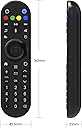
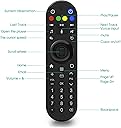
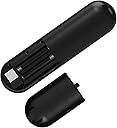
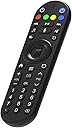
The Rii MX8 Wireless Air Mouse Remote Controller combines advanced IR learning, a user-friendly 2.4G wireless connection, and a replaceable battery design, making it the perfect companion for your smart TV, Windows, and Android devices. Enjoy seamless navigation and control with innovative features that enhance your media experience.
| ASIN | B07MHKMQ7J |
| Additional Features | Ergonomic |
| Battery Type | AA |
| Brand | Rii |
| Button Quantity | 8 |
| Color | Black |
| Compatible Devices | Television |
| Connectivity Technology | Infrared |
| Controller Type | Button Control |
| Customer Reviews | 4.2 out of 5 stars 212 Reviews |
| Item Weight | 0.15 Pounds |
| Manufacturer | Rii |
| Max Number of Supported Devices | 1 |
| Maximum Number of Supported Devices | 1 |
| Maximum Range | 10 Meters |
| Mfr Part Number | MX8 |
| Model Name | 8541649575 |
| Model Number | 8541649575 |
| Special Feature | Ergonomic |
G**E
excellent little media remote!
I was worried that it might be too big/bulky, but it's actually pretty compact, and fits my hand comfortably. It's about 6 inches long. Build quality is excellent. It feels solid and durable. And I don't know if it was intended or by design, but the remote is weighted in such a way that you can easily tell if you're holding it upside down. Scroll wheel is pretty cool and useful. I use it on my Ubuntu machine, so ended up using udev hwdb rules to remap a number of the keys to work better as a media playback remote. You can use evtest to find the key values that are being sent by the Rii remote, for remapping purposes. The little user manual that came with is terrible. Tried using it's directions to program the 5 programmable IR keys, so that I could use this remote to control my television, but the directions were so badly written that I was unsuccessful at it. Finally, I looked over some of the reviews here on Amazon and a user had written some instructions which I was able to use, to successfully program the 4 color keys + the greyish blue power button in the upper right corner of the remote. I added the following television control functionality to my Rii remote: 1. television power on/off; 2. television volume up; 3. television volume down; 4. television input menu; 5. television select/enter. This covers 99% of what I used my television remote for, so I can now use my Rii remote to control my television and stash my television remote in a closet. My one concern, at this point, is that there is a little blue led light that stays on for about 30 seconds whenever you press a button on the Rii remote. Worried that this might adversely affect battery life. I'll try to update this review if I encounter any significant issues with the battery life. BTW, here are my instructions on how to program the 5 programmable IR buttons on the Rii remote: How to program the 4 color buttons and the greyish blue power button: 1. Hold down the color button that you want to program. It will blink quickly for about 3 seconds. When it stops blinking and shows a steady light, release the button. 2. At this point, within the next 10 seconds, point your tv remote's ir transmitter to your Rii remote's ir transmitter/receiver and press the button on your tv remote that you want to program. 3. If the Rii remote received the signal, it will blink rapidly 3-4 times to acknowledge that it successfully received the code. 4. Now test your Rii remote's color button, on your television, to verify that it programmed successfully!
B**I
Mic works with Chromecast with Google TV and Button Mapper
Pretty good remote for $8. I use it with a Chromecast with Google TV (android TV) to replace the silly little included remote. Remapped the buttons with Button Mapper app. The mic DOES work, but the mic button does not send a button press event. You must map another button to trigger the Google assistant, and then HOLD the dedicated mic button on the remote for it to pass your voice through. Sort of annoying, but also somewhat comforting that the remote isn't capable of listening 24/7. The big cons to me are that it has a blue light that never shuts off, and it can be slightly bothersome at night. The mouse function is nowhere near as smooth or accurate as my LG magic remote. Most LG TV's have IP control, and you can use Button Mapper to send netcat commands to open the brightness settings or change volume or whatever you want. I mapped the top colored infrared buttons to my LG air conditioner. Sound bar and power controlled via HDMI-CEC. Now I really can just use one remote for everything. (As a side note for those with an android TV, I mapped the page up and down buttons to the TV Volume control using IP commands. The native volume buttons control the chromecast volume. This allows volume control via Google assistant voice commands and volume reduction while speaking, while still allowing you to control the TV/soundbars actual volume. If you do straight passthrough, volume controls will control the TV fine via CEC but you lose out on assistant/voice control).
S**H
Best remote ever for Android TV box.
Amazing product for an amazing price. I bought an Android TV box because I like to try new technology. I thought it would be similar to a Fire Stick. I was way wrong. Biggest issue with Android TV box is that it thinks it a tablet or a phone. Most of the apps require touchscreen. So the remote that comes with the box is almost useless and difficult to navigate. I wanted something that had an air mouse. I tried my mini keyboard with touch pad. Worked well. But not perfect. I found this remote and it was everything I didn't know existed. The scroll button is basically the same as a computer mouse. I didn't find that on any other air mouse. It's great because you can scroll up & down while also pointing the mouse. Most air mouse do not allow this. If you push the scroll in, it works like a button. Brilliant! Certain apps don't like the air mouse. That's fine. It turns off with a single click & you can use the directional pad. Like a normal remote. The voice button doesn't seem to work. I'm sure it's not the remotes fault. I assume my box isn't capable. The remote is quite heavy. In a good way. Hard plastic. Seems very durable. It has 4 programmable IR buttons. Super easy to program. Just press the button you want in for 3 seconds until light stays on. Then press the button on your TV remote & it picks it up. I set it to turn my TV on, turn volume up & down & change aspect ratio. Perfect. It made my Android box go from almost useless to perfect. Update: the voice button does work with Android 9. I had to install/update Google Assistant. However, it doesn't work like I thought it would. Simply pressing the button while on the home screen doesn't bring it up. But in some apps, or in some searches it will. You can launch the assistant & it will work fine. I can't stress enough how great this remote is. My T95 Mini android TV box was garbage until I got this thing. I was so unhappy with that box. Brand new & junk. Now I love it. Thanks to this remote.
P**B
Great for Raspberry Pi and LibreELEC!
Before I got a streaming stick for the bedroom, I used this remote to control a Raspberry Pi 3B with LibreELEC flashed on its SD card! It has all the buttons I need, it works great, and the dongle doesn't consume enough power to overwhelm the Pi! Thought the "air mouse" feature was going to be gimmicky at best, but I've used it more than I thought I would, and I love it! Mic button doesn't work on this platform, but the IR power button is a welcome addition, as it allows me to turn the TV (which does not support HDMI-CEC) on and off as well! Great value for the price!
R**N
Works well for the vast majority of functions!
I currently use this remote with a LG TV and Nvidia Shield. Pros: - The base controls work great! I love the size! - Pointer is great to have as some apps have issues without it. (Some apps won't allow navigation with the standard D-Style pad) - Battery life hasn't been a problem. - IR learning feature works without issue. I can control TV volume as expected. Cons: - I had issues with the on-screen keyboard activating when needed with this remote. - The built in voice function isn't as integrated as you would expect. I can sometimes get it to work by using the mouse pointer function and hitting the microphone button on the remote and then pressing the mic button on the remote. - Some buttons on the remote seem to have no function? Like the button labeled "OK".
A**R
Recommended
unfortunately very good product but product not available any more
A**Y
Not working well at all
Purchased two of these as replacement for my Mibox S standard remotes because I wanted the additional features. Remote is not very responsive at all. The original works much better. Ended up putting it back in the box. Hopefully I find some other use for it at some point...
C**R
Liking this remote
Usually don’t leave a review. I don’t want to sound like the typical customer. But I am really digging this remote. It is small and ca slip out of your hand if you are not careful. But when I plugged it into my android tv box it responded very well. I can’t give it 5 stars because it’s only day one. But so far so good. I hope it continues giving a good signal my tv box. So try it out. Trust me. If it acts up or it will be going back I promise you this.
Trustpilot
2 months ago
1 day ago