


🌬️ Chill Out with Smart Control!
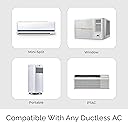
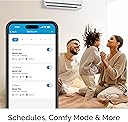
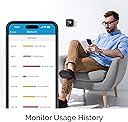
The Cielo Breez Plus is a cutting-edge smart air conditioner controller that transforms any infrared-controlled AC unit into a smart device. With Wi-Fi connectivity, voice control compatibility, and energy-saving features, it offers unparalleled convenience and efficiency. Enjoy local and remote control options, automated comfort settings, and a user-friendly app that tracks your AC usage history.





| ASIN | B07MPG1Y23 |
| Additional Features | Comfy Mode, Scheduling, Geofencing, AC Usage History tracking, Air filter status tracking |
| Backlight | Yes |
| Best Sellers Rank | #519,760 in Tools & Home Improvement ( See Top 100 in Tools & Home Improvement ) #561 in Home Programmable Thermostats |
| Brand | Cielo Breez |
| Brand Name | Cielo Breez |
| Color | Black |
| Connectivity Protocol | Wi-Fi |
| Connectivity Technology | Wi-Fi |
| Control Method | App, Touch |
| Control Type | Touch & App Control |
| Controller Type | Touch, App, Alexa, Google Assistant, Siri, SmartThings, IFTTT |
| Customer Reviews | 4.5 out of 5 stars 2,506 Reviews |
| Display Type | LCD |
| Global Trade Identification Number | 00853937007204 |
| Included Components | 5V adapter & USB cable, Cielo Breez Plus, Table Stand, User Manual, Wall Mounting Kit |
| Item Dimensions D x W x H | 1.02"D x 4.33"W x 4.33"H |
| Item Type Name | Smart thermostat for ductless air conditioners |
| Manufacturer | Cielo WiGle |
| Manufacturer Warranty Description | 1 year replacement warranty. |
| Material Type | Acrylonitrile Butadiene Styrene (ABS) |
| Model Number | BP101WA |
| Mounting Type | Wall Mount |
| Power Source | Corded Electric |
| Product Dimensions | 1.02"D x 4.33"W x 4.33"H |
| Product Style | Smart |
| Shape | Square |
| Special Feature | Comfy Mode, Scheduling, Geofencing , AC Usage History tracking, Air filter status tracking |
| Specific Uses For Product | Make any infrared controlled ductless AC or heat pump smart |
| Specification Met | energy |
| Temperature Control Type | Heating and Cooling |
| Voltage | 12 Volts, 5 Volts |
W**S
Intuitive App, Easy to Set Up Hardware
I really like this thermostat / remote control. I have an Alpine ductless mini-split air conditioner in my detached garage. I was looking for a humidistat, as the AC by itself runs continuously in "dry" mode as it doesn't have a built-in humidistat. I also wanted a way to be able to remotely control my unit so that I can adjust the temperature remotely before I go out to work in the garage. The unit is very easy to set up. It took me all of 3 minutes to go from a sealed box to a working thermostat with remote control via WiFi. I was very impressed by this. The app allowed me to login with my Google profile, so this was not yet another username/password combo I needed to make. Once in, it was just a few quick steps to configure it to my AC unit. The app itself is very intuitive and has all the features I'd like to see, so far. The unit and app remind me of the approach taken by ecoBee, which I use in my home. You can set ranges and actions for either temperature or humidity levels. Given that my AC unit has a built in temperature sensor, I don't need the "comfy temperature" feature really, but the "comfy humidity" feature is very helpful to me. Additionally, you can set up a schedule like a standard thermostat where you can cycle your unit on/off or adjust temperatures based on your needs. This is nice given that there's no way to do this on the AC unit itself. WiFi reception appears to be very good. My garage is across my property from my home and WiFi, while it reaches the garage, tends to be weak. My cell phone has intermittent WiFi connectivity when I'm in the garage. This thermostat has no trouble staying connected and operating correctly, and my router reports that it has a reasonably strong connection to the thermostat. The hardware itself appears to be based on Espressif's ESP32 Arduino architecture, with which I just spent several months working. It would almost be worth buying a second one to open it up and take a look at how they developed their unit just for fun. Infrared reception to the AC unit is great. I moved it around the garage just to experiment with it, and it appears to flood the room with infrared well enough that I probably could've mounted the thermostat wherever I wanted to. In the end, I put it relatively close to the unit (but out of direct airflow) as that's what made the most sense, though. My AC unit came with a USB thumb drive WiFi controller that works with the NetHome app. I tried it, and while it's "ok", it's not the best and it has no real advanced or programmable features to speak of. This thermostat makes up for that, and I will probably disconnect the one that came with the AC unit going forward. I should not that customer service was helpful. I talked to them on the phone when I had a question about setting up the "comfy humidity" feature (which, to be fair and had I opened my eyes, I would've been able to figure out myself). They answered quickly and walked me through my question. I also talked to them via email when the app appeared to stop working. It turned out that they were having an issue with their AWS server(s) that was resolved relatively quickly. Overall, I'm extremely happy with this thermostat and will absolutely buy another one when I install my next mini-split in my other building. It's well made, easy to use, easy to set up, has plenty of features, and appears to be well supported by the folks who made it.
N**P
The Cielo Breez Plus CAN work as a thermostat!
Several commenters have said that this device is nothing more than a way to make your AC mini-split controllable from your cell phone. But it’s more — it does have an internal temperature sensor, and it CAN operate as a thermostat, but you wouldn’t know that from the supplied printed instructions, which make no mention of the Comfy mode settings required to enable thermostat operation. I didn’t know this mode existed until I read Joe R’s comment from 11/23/2020, which sums it up nicely. I was able to get Comfy mode operational, but had several questions related to fine tuning. I selected Support from Cielo’s web site, per the printed instructions, and a live chat box popped up. I entered one of my questions, and customer service rep Mark immediately picked up. After a little back and forth, Mark decided it would be best to proceed by phone. I gave him my phone number and he called me immediately. He patiently worked with me until I both knew what to do and why. GREAT customer service! Basic setup of the Cielo app is straightforward, and is explained well in the printed instructions. After setup, to enable Comfy mode… Fire up the app, and click on the appropriate device. At the top of the device page, you can select mode — I’m using Cool. Fan Speed is obvious. Swing does work (if your AC remote supports it), but setting it isn’t obvious — you need to eventually do trial and error on the various Position settings to get the air distribution angle(s) that you want. For now don’t worry about it. At the bottom of the page click on Esaver. At the top of the next page click on Comfy Mode. Ah ha! At the top of the next page turn the slider switch on, then click on the right arrow next to it. The following page displays all the settings related to Comfy Mode. For my situation: Temperature range: 74 degrees to 74. (Operating this slider would be easier on a tablet.) If room temp falls below 74, Cielo turns off cooling by setting AC to 80 (leaving power to AC device on), while leaving fan on (Mode = Fan). Fan speed is Low. Swing is Position 2, which for my AC unit (Lennox) is the uppermost air output direction. The LED indicator on the AC unit stays On. If room temp rises above 74, Cielo turns on AC cooling. Power is On, Mode is Cool, Fan speed stays Low, Swing stays in Position 2, and LED stays on. Temperature setting sets the AC device to 73, a bit lower than my 74 range setting, to insure that the AC unit keeps cooling during this period. Alter these settings to suit your situation. Then be sure to click Done so that the Cielo app keeps your settings! I’ll leave it to you to experiment with Morning, Aternoon, Evening, and Night settings. You can have the Cielo device control for humidity instead of temperature, but note that whatever you may set up for Comfy Humidity will undo your Comfy Temperature settings! Feel free to use your regular AC remote as you desire to alter your current situation; Cielo only sends commands to the AC device once each time room temp goes above or below your Cielo range setting. It doesn’t keep fighting with what you do with your regular remote the rest of the time. If your remote won’t let you alter settings, click its on/off button. This setup into apparently applies equally to the Cielo non-display unit, which can apparently do the same job(s), but I like having the display on the Breez Plus, to track room temp and see what the Cielo app is doing.
A**Y
Best of Breed & Excellent Support
I have owned 2 Cielo Breeze Plus devices for a number of months during mainly the air conditioning season, however it is becoming colder in the fall now (I live in Ontario, Canada) and I am experiencing the devices in the heating mode now. I did a lot of research and purchases/returns until I found the Cielo Breeze Plus. Why did I search for this device. I have 2 mini split heat pumps (Mitsubishi & Bosch) that work well except that they miss the following functionality: - the temperature is measured at the indoor head unit which does not reflect the temperature where the occupants are located (especially important with cathedral ceilings). - there is no wifi control for remotely setting the units - when the temperature goes cold outside the built in heat pump algorithms in the units do not ramp up the fan speed to increase the heat pump’s capability to heat at the maximum capability of the unit. It requires manual intervention to raise the fan speed even when set to auto. To me, this is a huge oversight by the manufacturers - the remote device (in this case the Cielo Breeze Plus ) must support the functions of the particular heat pump IR controls - ease of setup . - simple user interface with the ability to create programs that exceed simple scheduling - reliability (100% uptime) & local control (can run without Cloud service) - good IR coverage (improves placement of the controlling device for coverage & room aesthetics) - customer support The Cielo Breeze Plus addressed all of the above must haves unlike the other similar devices I tried to use and returned or enquired about. The best functionality of all & why I kept the devices is the ability to setup “Comfy Mode” programs. These allow me to set specific conditions, such as dropping room temperature, that tell my heat pumps to increase fan speed as well as other functions. This is huge because nobody get’s up in the middle of the night to check if their heat pump fan is not meeting the heat demand to turn up the fan speed. Initial setup and operation was easy on both Cielo Breeze Plus units. My older MR Slim Mitsubishi unit IR control set did not exactly match the available fan speeds which I needed to have addressed by their Customer Support which they did. I was pleasantly surprised at how they were able to use the Cielo Breeze Plus device to remotely capture my MR Slim original remote control IR codes and modify an IR program profile that they incorporated into & downloaded into my Cielo Breeze Plus device. This was an amazing capability that they designed into the Cielo Breeze Plus and that their support department is prepared to handle an issue such as this. The display of the Cielo Breeze Plus is great and it is legible. I would have liked the ambient room temperature to have been slightly bigger in the display as I am older and the unit sits across the room which at the moment is just at the extent of my eyesights ability to resolve the number. The set temperature is very easy to read as it is larger. So both Cielo Breeze Plus devices were not cheap but there is no other device I found that can do what these do and the customer support is head and shoulders above the others.. I have no regrets paying a bit more for this functionality. I am a satisfied customer!
P**O
Great product, amazing tech support
In a nutshell: if I could, I would give them 6 or 7 stars for tech support! I purchased a Cielo Breez Plus to see if it would work remotely for a B&B in Italy. When I arrived I found out that the A/C + heating split is an old (2008) model from a relatively unknown Chinese brand. I tried the auto-detect, but the Cielo unit did not recognize my remote, and the manufacturer did not appear on the list for manual settings. I emailed them expecting it would take more than the two days I was staying here. Instead, I got a response within a few hours encouraging me to call their support number. I ended up speaking with Sam, who asked me to walk through a number of steps, essentially testing all the functionality of the remote while pointing it at the Breez Plus unit, which collected the control codes. After that he said he'd talk to his data team and see what they could do. Again, I expected it would take a while to hear back, but he called me back the next day. I was away from the unit and asked if we could chat a few hours later, and when I got home I let him know I was back and he called me immediately. Much to my surprise, I turned on the unit and it worked! They had already added the unit to their database. Sam asked me to test all the functionality while he was on the line. This is possibly the best customer support experience I have ever had. As to the unit itself, I need multiple of these to control multiple splits in a B&B. I wanted something that would be easy to use for my guests while allowing me to keep an eye on things remotely. I have tried other products and had been reluctant to buy this one because of its price. But after buying and returning two other, less expensive competing products, I can say this unit, while expensive, is definitely worth it. The unit works really well either as a physical controller on-site, or remotely trough the app. It has exactly all the features I wanted: easy to use, easy to control remotely so I can monitor usage, easy to set boundaries so our guests won't use extreme settings to turn the place into a refrigerator or a sauna. I also tried it while my phone was connected through a VPN back in the US (even though I was in Italy at the time), and it worked flawlessly with a nearly instantaneous response time. This unit is amazing, and I will be buying several more shortly. Whether you run a B&B like me, or want to use it for your own home, this product is head and shoulders above the competition.
T**M
This is the wifi controller to get for your mini-split...
If you have a mini-split that did not come with built-in wifi controls (and even if you have one with them) this is the wifi controller to get (Cielo Breez Plus). I have two Fujitsu HVAC units, one with wifi controls and one without. I've tried a different brand of wifi controller (name begins with an S), but I didn't like it for a few reasons. It had no local controls, so if someone used the Fujitsu remote, it would be out of sync. Plus, the settings in the app never matched what the Fujitsu remote could do. For example, the Fujitsu would adjust temperatures in two degree, even increment, but the controller would change to 1 degree, odd numbers at places across its range (apparently a rounding error, according to the manufacturer). The app didn't have all of the correct functions of the Fujitsu app either. It was missing the right swing mode and couldn't set minimum heat. I got tired of trying to get these things added with the manufacturer. The Fujitsu built-in wifi controller was clumsy. Very difficult to set up, and then their app was slow and difficult to use. So I bought two CIelo Breez Plus units. They have been absolutely perfect. Easy to set up. Settings in the app match the Fujitsu remote almost exactly. In fact, Cielo's website lets you confirm that your exact remote model number will work with their system, and you use the remote model number to set up the software, so you know it's right. The app is clean, quick, and works well. All functions work, and you don't need to sign up for any premium plans to get access to them. I love having local controls too, so when the kids come and change something, it's immediately reflected in the app. I took the batteries out of the Fujitsu remotes and stored them away. I've always just set a temperature on the Fujitsu and let it do its thing to achieve it. So I can't understand many of the comments I've read where people are having issues with temperature control with the Cielo Breez Plus. I suspect they are using the "Comfy" mode which relies on the Cielo making adjustments to temperature setpoint based upon its internal temperature sensor. I've never had a need for this because the Fujitsu's control to their own temperatures so well. I could see "Comfy" creating some conflicts because it could end up fighting the internal temperature control of a mini-split. I might end up using "Comfy" to set up some thresholds to turn the mini-split on (from an off state) at very low and very high temperatures, in case I forget to do it manually when the seasons change, but this is all I personally see it being useful for. Plus this integrates with Smartthings perfectly, which is my home automation system of choice. Again, based on my experience with a different brand and a built-in wifi controller, if you're looking for one of these IR-blaster style wifi units for your HVAC, this is the one to get.
S**P
Good, but just missed great
On the first day with this thing, I realized I've been using my mini-split wrong all along. If I want it, say, cooled to 72 in my house, I should not set the mini-split to 72. I should set it down to, like, 66, and let that sucker blow really cold for a bit, then turn it off. The mini-split knows what temperature its blowing, not what temperature it is in the room. (In retrospect, this makes sense. There's no sensor anywhere else in the room.) SO, the Cielo breeze solves this problem by being an actual thermostat. It senses the temperature, and, via "comfy mode" can turn the mini-split on and off as needed (e.g., turns that thing on to blow 66 degree air until it is less than 72 degrees, then shuts off until it is, say, over 74 again). This has improved the climate control in my living room dramatically. Why did I drop a star, then? Well, here's (what I think is) the problem: the unit and the app don't refresh as often as they should. I'm not sure how often these things are in communication, but it isn't often enough. My cielo thermostat will say it's 75 degrees (which means it's time to turn on the mini-split) but the app will still show it as 74 or 73. I wish there was a setting to make them sync to each other more frequently, but it doesn't exist. Second problem (which is probably just a second effect of the same problem) is that comfy mode makes it get out of sync a LOT, which it shouldn't. Picture this: the room is very cold in the morning. I use the app to turn the minisplit on heat, which it does. I then turn on "comfy mode" which is that thing that sets a range of temperatures for the heater. Comfy mode immediately realizes that the minisplit should be on, so it activates the power toggle, and the heater (which I'd just turned on) now turns itself off. Another time, when I wanted to activate "heat" comfy mode and the minisplit was last on "cooling," it turned on, but with more cooling. (I think this is still just the app and the thermostat not quite knowing each other's status.) There is a button you can hit to sync the app to the state of the mini-split, which I've used QUITE A LOT in the first few days I've had it, because whenever I try to automate something, the commands get fouled up and everything is out of whack. This feels like the sort of thing that can be remedied with a good app update. In the meantime, just having the thermostat in here (and the ability to use comfy mode when I can keep my eye on it and get it started properly) is worthwhile. It just could be so much better.
M**L
Great WiFi Solution for Mini-Splits
Update 5/14/20: This unit has been working great for over a year, very few complaints about it. At this point, really the only significant thing on my wish list would be the ability to bypass the initial Home / Devices screen that comes up in the app and go straight to the full control page for the device... I can understand the need for the home screen (if you have multiple devices), but for those of us with only one, it would be great to skip that extra unneeded tap. I've found one of the best uses for the Cielo is, as briefly mentioned in the original review, the timer. In particular, you are not limited to having it simply turning the unit off and on. I have mine programmed to turn on at 10am, but then at 9pm instead of turning off, it switches to FAN mode for several hours, turning off at 11pm. Why is this important? I've discovered over the years that the blower wheel in my mini split has a tendency to get horribly caked-up with mold growth. In addition to being unhealthy and disgusting, it drastically reduces the efficiency of the blower. My belief was that this mold was the dark / moist conditions that existed inside the unit when it was shut off each time was the culprit, and that letting just the fan run for a while would dry it out. And that does seem to be working as hoped. Also, shortly after posting my original review, the CEO of the company sent me a message to let me know that the ability to adjust/calibrate the displayed temperature and humidity would be available soon, which it was. Original review: I've been wanting something like this for years, but never knew it existed until I noticed an ad for a similar device from a competing manufacturer on Facebook. After further research, I found this one, which I decided would work better for me since it has a built-in display and controls (so that I, and family members, can easily adjust the thermostat without the app if needed). I wanted it so that I could set up a more extensive automatic schedule for the Mitsubishi mini-split that provides supplemental cooling to my home office. I also wanted to have the ability to turn it on or off when away from home. So far, it seems to work as advertised. It was easy to set up, though I had one minor issue, in that after auto-detecting my unit's remote, it set the temperature display to C. There was no option to change it to F, but after removing the remote and re-adding it manually, I discovered that the C and F setting is made during setup (apparently it detected my remote as a C model, not an F model). Manually selecting the model number of the remote, along with the F version, solved that problem. I also noticed that "Fan" mode was not available when the remote was auto-configured, but did appear after manually adding. The temperature displayed is 2-3 degrees lower than several other known-accurate thermometers I have, even after letting the unit acclimate for a day. The manufacturer should consider adding a temperature adjustment/calibration option for this (allowing the user to shift the displayed temperature +/- 5 degrees or so to match other thermometers). Same with the humidity display. Another nice feature would be an option to automatically set the A/C to a lower temperature in response to higher humidity.
T**S
Customer Support Rocks!
I am updating my original review, which appears below. I wanted to share my most recent experience with Customer Service. We have 4 Cielo Breez Plus devices connected to 3 Daikin mini-split ACs, and 1 larger McQuay cassette-style mini-split (made by Daikin), in our vacation home in Costa Rica. Two of the units have worked flawlessly. One Breez Plus has given us problems, as it would change temperature, by itself, usually in the middle of the night. I contacted customer support on several occasions, and they have been very quick to respond (by chat). Customer Support has been very patient in trying to resolve the issue, and offered many different ideas, such as changing the power supply, plugging the unit into a different wall plug, etc.. Finally, I found the culprit. We had a wall plug (on the same circuit) that was a wall plug with USB outlets on it. I replaced it with a normal electric wall plug, and that seems to have done the trick. So, the problem was no fault of Cielo. The other issue was the McQuay brand cassette mini-split, which is not a common brand, in the US. Trying to set up the remote was frustrating, as, the options provided did not fully control the unit. After talking to Customer Support, Cielo was able to capture the remote control signals, through the Cielo Breez, over the internet, and within a few days, Cielo had created a Remote Control program, that is specific to our remote for that unit. Now, I can fully control the McQuay unit, and all of my Breez Plus units are up and running. The Breez Plus has all of the features I was looking for, to control the AC units, in our vacation home. Remote access, temperature Range Control (hi/lo); Scheduling, usage reports, etc. Highly recommend Cielo! ORIGINAL POST: I have four of the Cielo Breez Plus units units installed at our vacation home. After researching the various thermostats, I found these to have all of the features that we could want. We can set schedules. We can set geo fencing so the units turn on or off when we arrive or leave the property, or set timers to turn off the units. We can remotely control the units from anywhere! Most importantly, we can set high and low limits for the air conditioners, as our property is a vacation home rental and we can prevent guests from turning the temperature down too low, and causing damage to the AC units. The app also shows the history of the AC usage, which is helpful to know how long the units have been running. I have had to contact tech support a couple of times, and they have answered the phone very quickly and have been super helpful. I highly recommend Cielo thermostats, especially the Breez Plus which has the digital display.
ترست بايلوت
منذ شهرين
منذ أسبوع